
CrispSweep Cleaner
Vouch VaultProductivity
4.45.00 Reviews
- Version
- 3.0.1
- Installs
- 10.00K
- Age Rating
- Everyone
Screenshots
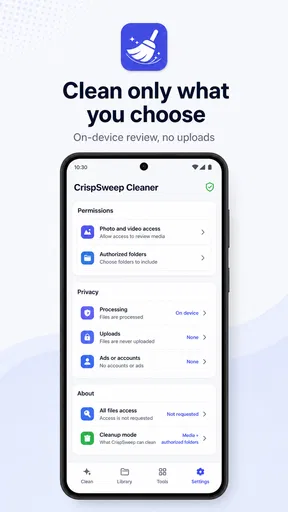
Our Review of CrispSweep Cleaner
 Analysis by Appyee
When my phone starts feeling crowded, I usually want a focused cleanup tool rather than a complicated system-management suite. CrispSweep Cleaner takes that narrower route: it scans media and folders I choose, then lets me review items before cleaning them. That basic approach makes sense to me because deleting personal photos or files should never feel like an automatic gamble.
Developed by Vouch Vault, this free productivity app is aimed at people who want a more deliberate way to tidy storage. I found the central idea easy to understand: choose where to look, inspect what the scan finds, and decide what should go. It is available for Everyone and supports Android 8.0 or later, so the practical question is less about learning a new system and more about whether this review-first workflow suits the way you manage files.
How CrispSweep Cleaner handles a cleanup
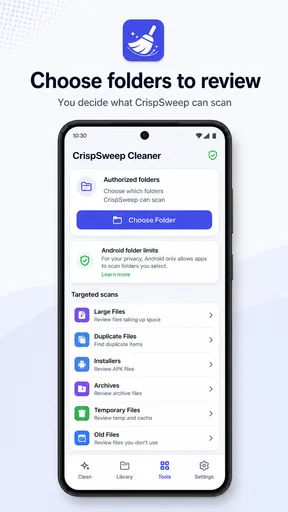
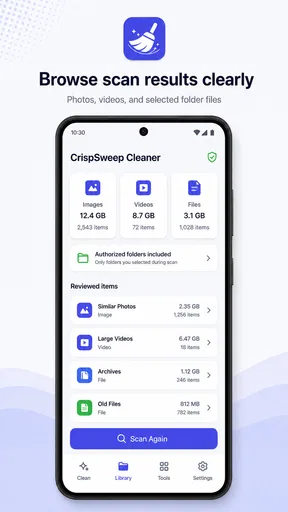
The app’s most useful distinction is that it works with both media and selected folders. That gives me more control than a button that simply promises to “clean” the whole phone. A media scan can help when the problem is a growing camera roll, while a folder scan is more appropriate when downloads, exported documents, or app-created files are the real source of clutter.
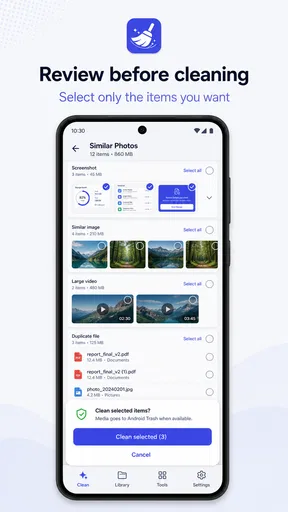
I would begin with one area instead of scanning everything at once. That makes the results easier to understand and reduces the chance of selecting something important in a long, mixed list. After the scan, the review stage becomes the main part of the experience: I can examine the proposed items and choose only the ones I genuinely no longer need.
The review step is the feature that protects the value of the app. A cleaner is only helpful if it saves time without taking away control. By making selection part of the process, CrispSweep Cleaner is better suited to cautious users than tools built around aggressive automatic removal.
A practical workflow for everyday clutter
Imagine returning from a trip with a full camera folder, several downloaded images, and a handful of files copied into a personal folder for sharing. I would first scan the relevant media, remove obvious duplicates or disposable images after checking them, and then inspect the chosen folder separately. Keeping those tasks distinct helps me avoid treating a useful document like an unwanted photograph.
There is also a useful habit here for people who regularly move files between devices. Before starting a cleanup, I would identify the folder that acts as a temporary holding area. Scanning that location after a project is finished can be more effective than repeatedly searching the entire phone. The app’s support for chosen folders makes this targeted routine possible without turning every cleanup into a device-wide inspection.
Another practical tip is to clean in short sessions. A small media review after a busy week is less tiring than waiting until storage becomes a crisis. It also makes decisions clearer because I am more likely to remember why a recent file exists. This is not a flashy feature, but it is where a selective cleaner can fit naturally into real phone maintenance.
What the current release means for users
The current version is 3.0.1, and the app has reached more than ten thousand installs. Its average rating is 4.4 from 29 ratings, with five written reviews. Those figures suggest that people have begun using it, but they are still a relatively small sample, so I would treat the rating as an encouraging signal rather than a complete record of long-term reliability.
That matters especially for a cleaning utility. The important test is not just whether a scan appears quickly; it is whether the results are understandable and whether selection feels safe. A small review history gives me less community evidence to lean on than I would have with a long-established storage manager, so I would personally start with low-risk folders and observe the workflow before making it part of a regular routine.
Where the free price creates real value
CrispSweep Cleaner is free, which changes the decision considerably. I do not need to weigh a subscription or an upfront purchase against the amount of storage I might recover. For someone who wants to try a focused cleanup workflow, free access lowers the cost of experimentation: install it, scan a manageable location, and decide whether the review process is useful enough to keep.
That does not mean free automatically equals better value. The value depends on whether the app helps me make decisions faster and with fewer mistakes. If I already keep my media organized and rarely use local folders, a free cleaner may add little to my routine. If I often accumulate screenshots, downloaded images, or temporary project files, the ability to examine selected areas can make the app worthwhile without requiring a paid commitment.
I also appreciate that the price does not encourage me to buy a larger package than I need. Some storage tools bundle cleanup with many unrelated controls, which can make a simple task feel oversized. Here, the appeal is more direct: use a scan, review the candidates, and clean selected items. For a person who wants that specific job, free access offers a low-risk way to see whether the workflow earns a place on the phone.
What you actually gain from the focused approach
The strongest value is control over scope. Instead of beginning with the assumption that every accessible location should be examined, I can choose a folder that has a clear purpose. That is particularly useful for people who share a device with work and personal material, or who keep important documents in carefully named directories.
The second benefit is decision quality. A review-first process encourages me to distinguish between clutter and material that only looks expendable. A screenshot of a receipt, a downloaded travel document, and a duplicate meme may all live near one another, but they do not deserve the same treatment. The app’s usefulness comes from giving that distinction room to happen.
The third benefit is repeatability. A good cleanup method should be easy to remember. I can create a simple cycle: scan a particular folder, inspect the results, remove selected items, and stop. That is more sustainable than relying on a dramatic once-a-month purge. In my experience, a modest routine often delivers more practical value than a tool with a long list of features that I never use.
How it compares with the usual alternatives
Compared with manually opening folders in a file manager, CrispSweep Cleaner offers a more purpose-built review experience. Manual browsing gives me maximum visibility, but it can be slow when a folder contains many similar images or accumulated media. The cleaner’s advantage is the focused scan-and-review sequence; the file manager remains preferable when I need to rename, move, sort, or inspect file details as part of a broader organization job.
Compared with a phone’s built-in storage screen, the app may feel more approachable for someone whose main concern is media and selected folders rather than system-wide storage categories. Built-in tools are often better for understanding which apps consume space, while CrispSweep Cleaner is more relevant when the problem is personal content that needs a human decision.
Automatic cleaning utilities are the closest alternative, but they make a different tradeoff. They can be faster when I am comfortable trusting predefined rules. I would choose CrispSweep Cleaner instead when the files have personal, work, or sentimental value and I want to approve removals individually. The price of that control is time: reviewing items is slower than pressing an automatic cleanup button.
Limitations I would consider before installing
The selective workflow is not ideal for everyone. If the phone is nearly full and I need immediate relief, a quick system storage review may be more efficient than carefully inspecting media and folders. Likewise, people who want automatic scheduling, broad device optimization, or a single dashboard for applications and system data may find this app too focused.
There is also a natural limit to what a review-based cleaner can do: it still depends on me making the final judgment. That is a strength for safety, but it means the app cannot remove indecision from the process. If I keep every questionable image “just in case,” the scan may identify clutter without actually solving the storage problem.
I would also avoid treating a scan as a substitute for backup habits. Before deleting meaningful photos or documents, I would make sure the files exist somewhere I trust. A cleaner can help select items, but the responsibility for deciding what is irreplaceable remains with me. That is an important tradeoff for any tool handling personal media.
Who will get the most from it?
I think the best fit is an Android user who wants a free, uncomplicated way to review media and a few known cluttered folders. It is especially suitable for someone who dislikes broad automatic deletion and prefers to see candidates before taking action. People who regularly download files for short-term tasks can also benefit from a targeted folder routine.
It may be useful for families or less technical users who need a clear cleanup task rather than a full explanation of storage architecture. The idea is easy to communicate: pick a location, look through the results, and select what can go. That simplicity can be more valuable than a long feature list when the person using the phone wants confidence instead of configuration.
I would skip it if my main need is application management, cloud backup, file transfer, or advanced file organization. A dedicated file manager is the better choice for moving and renaming content, while the phone’s own storage controls may be better for identifying large applications. CrispSweep Cleaner makes the most sense when the specific problem is reviewing removable media or folder contents.
My verdict on the download decision
For me, the free price makes CrispSweep Cleaner easy to try, but the reason to keep it is not the word “cleaner.” It is the combination of selected locations and human approval. The app gives a cautious user a practical way to work through clutter without handing every deletion decision to an automatic rule.
I would recommend starting with a low-risk folder, learning how the scan presents its findings, and then using the same targeted workflow for recurring clutter. That approach lets the app prove its usefulness without turning the first session into a high-stakes cleanup.
My final view is positive but specific: choose it if you want free, review-based media and folder cleanup on a compatible Android phone. Skip it if you expect a complete device optimizer or instant hands-off results. With its Everyone rating, Android 8.0 minimum, and focused purpose, CrispSweep Cleaner is best understood as a careful inspection tool—not a replacement for every storage feature on your phone.
Verdict
Strengths of CrispSweep Cleaner
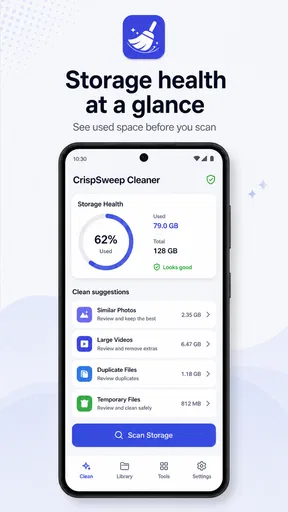
- Quickly identifies large files and duplicate photos
- Simple interface makes storage cleanup easy
- Useful filters help locate unwanted files faster
- Can free space without requiring advanced technical skills
- Provides a convenient overview of device storage usage
Limitations of CrispSweep Cleaner
- Some cleanup features may require a premium upgrade
- Scanning large media libraries can take noticeable time
- Automatic file suggestions should be checked before deletion
- Results may include files you still want to keep
- Cleaner performance can vary between Android devices
Similar Picks in This Category
View All
Google Calendar
Google LLC4.6

Google Drive
Google LLC4.3

Google Assistant
Google LLC3.9

Microsoft OneDrive
Microsoft Corporation4.6

Samsung Calendar
Samsung Electronics Co., Ltd.4.1

Microsoft OneNote: Save Notes
Microsoft Corporation4.6
Frequently Asked Questions
What is CrispSweep Cleaner and what does it do?
CrispSweep Cleaner is designed to help users organize and maintain their mobile devices by identifying unnecessary files, temporary data, duplicate items, and other content that may consume storage space. After reviewing its available tools, the app appears most useful as a simple cleanup assistant rather than a complete performance solution. It can help you decide what to remove, but you should always check suggested files before confirming deletion.
Is CrispSweep Cleaner safe to use on Android or iOS?
CrispSweep Cleaner should be downloaded only from the official Google Play Store or Apple App Store to reduce the risk of installing a modified or unsafe version. Like other cleaning utilities, it may request access to storage, photos, or device-related information depending on the platform. Review these permissions carefully, and avoid granting access that does not seem necessary for the feature you want to use.
Can CrispSweep Cleaner improve my phone’s speed and battery life?
CrispSweep Cleaner may make a device feel more manageable by freeing storage and removing clutter, especially when the phone is nearly full. However, cleaning files does not guarantee a major improvement in processing speed or battery life. Modern Android and iOS systems already manage background tasks efficiently, so the most noticeable benefit is usually additional storage rather than a dramatic performance boost.
Does CrispSweep Cleaner delete photos, videos, or important files automatically?
A cleaning app can identify large, duplicate, or potentially unnecessary files, but users should not assume every recommendation is safe to remove. Before using any one-tap cleanup option in CrispSweep Cleaner, carefully review the selected photos, videos, documents, and downloads. Keep backups of important content and confirm that files are not needed before deletion, particularly when the app is given broad storage access.
Is CrispSweep Cleaner free, and are there subscriptions or in-app purchases?
The availability of free tools, premium functions, advertisements, and subscription plans can vary between the Android and iOS versions and may change after updates. Before downloading or starting a trial, check the app-store listing and the payment screen for the current pricing details. Pay particular attention to renewal terms, trial duration, and cancellation instructions if CrispSweep Cleaner offers recurring premium access.
